NVIDIA Robotics Data Collection Kit
Overview
NVIDIA Robotics Data Collection Kit is a complete development kit for multi-camera robot data acquisition, combining NVIDIA Jetson AGX Orin with SENSING SG10A-AGON-G2M-A1 GMSL Adapter Board. SENSING has developed optimized camera drivers to enable seamless integration of GMSL cameras with the Jetson platform.
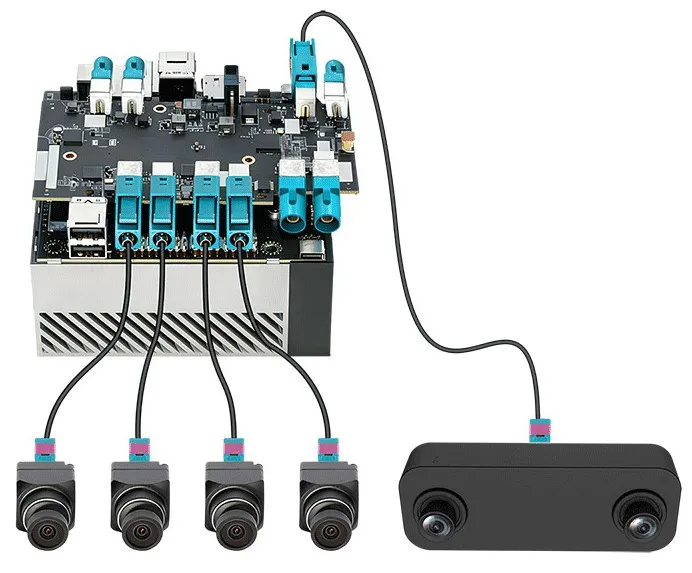
| Component | Provider | Description |
|---|---|---|
| Jetson AGX Orin | NVIDIA (Official) | Official development kit |
| SG10A-AGON-G2M-A1 | SENSING | GMSL adapter board, supports up to 10 cameras |
| Driver Package | SENSING | Based on JetPack 6.2, supports Astra S56 / S56C & SHF3L/SHF3H cameras |
System Architecture

SG10A-AGON-G2M-A1 Hardware Overview
Component Specifications
Jetson AGX Orin (NVIDIA Official)
- Module: NVIDIA AGX Orin (32GB/64GB options)
- Processor: NVIDIA Arm® Cortex®-A78AE CPU + NVIDIA Ampere GPU
- Software: JetPack 6.2 (L4T R36.4.3)
- Interface: CSI-2, PCIe, USB, Ethernet, etc.
For more details, visit NVIDIA Jetson AGX Orin.
SG10A-AGON-G2M-A1 (SENSING)
- Model: SG10A-AGON-G2M-A1
- Dimension: 88mm × 120mm
- Weight: 50g
- Connector: 1×120Pin High-density connectors
- Camera input: 10× GMSL2/GMSL cameras
- Trigger In: 4Pin Sync In
- Deserializer: MAXIM(ADI) MAX9296A ×3 MAXIM(ADI) MAX96712A ×1
- Camera Connector: Fakra Z Code
- POC Power Supply: DC 9-16V
- DC Power Supply: DC 12V
- Operating Conditions: -20°C to +70°C
- Up to 10 cameras support (GMSL/GMSL2 mixed)
- Power over Coax (PoC) - data, control and power over single coaxial cable
- Compatible with NVIDIA Jetson AGX Orin and Jetson AGX Thor
- Flexible cable routing for automotive applications
For more details, visit SENSING SG10A-AGON-G2M-A1 GMSL Adapter Board.
SG10A-AGON-G2M-A1 Block Diagram
(1)The I2C bus number is the hardware location (matching the connector). The bus number does not necessarily correspond to what is listed in the software.
(2)The coaxial power supply is shared, but each GMSL line has its own filter.
(3)Important: Connect pins 2 and 4 of J19 on the adapter board together to enable camera synchronization.

J19 Pin Definition
| Pin NO | NAME | Remarks |
|---|---|---|
| 1 | GND | Ground |
| 2 | SYNC1 | Trigger pins for U19 and U4 |
| 3 | GND | Ground |
| 4 | SYNC2 | Trigger pins for U13 and U3 |
When using trigger mode, SYNC1 (Pin 2) and SYNC2 (Pin 4) must be jumpered for the cameras to trigger properly.
Supported Cameras
The latest driver package supports Astra S56 / S56C and SHF3L/SHF3H cameras.
| Model | Type | Resolution | Shutter | Data Format | FOV (H) | Role / Position | Max Quantity | Port | Docs |
|---|---|---|---|---|---|---|---|---|---|
| Astra S56C | Stereo | 2 * 5MP | Global | RAW | 140° | Head: Depth & VLA | 1 | J27/J29 | View Specs |
| SHF3L | Monocular | 3MP | Rolling | YUV | 190° | Hands: HDR 30fps Monocular Camera | 6 | J21-J26 | View Specs |
| SHW3H (Optional) | Monocular | 3MP | Rolling | YUV | 120° | Head: HDR 60fps Monocular Camera | 6 | J21-J26 | View Specs |
Camera to Device Node Mapping (JetPack 6.2)
| PORT | DEV NODE | Camera |
|---|---|---|
| J27 | /dev/video0, /dev/video1 | S56 / S56C |
| J29 | /dev/video2, /dev/video3 | |
| J25 | /dev/video4 | SHF3L/SHF3H |
| J26 | /dev/video5 | SHF3L/SHF3H |
| J23 | /dev/video6 | SHF3L/SHF3H |
| J24 | /dev/video7 | SHF3L/SHF3H |
| J21 | /dev/video8 | SHF3L/SHF3H |
| J22 | /dev/video9 | SHF3L/SHF3H |
Hardware Preparation
Kit Contents

Parts List
| Serial number | Product model | Quantity | Remark |
|---|---|---|---|
| 1 | Power adapter | 1 | Standard |
| 2 | Power switching harness | 1 | Standard |
| 3 | SG10A-AGON-G2M-A1 adapter board | 1 | Standard |
| 4 | Copper column, M2.5×12+5 | 3 | Standard |
| 5 | Screw, M2.5-F | 3 | Standard |
| 6 | Jetson AGX Orin DK | 1 | Optional |
| 7 | Trigger line | 1 | Standard |
Installation Steps
- Connect the GMSL camera to the SG10A-AGON-G2M-A1 board using the coaxial cable
- Important: Connect pins 2 and 4 of J19 together to enable camera synchronization
- Mount the SG10A-AGON-G2M-A1 board onto the Jetson AGX Orin module
- Connect the power supply
- Power on the system
Software Preparation
Driver Package Download
| Camera Type | JetPack Version | Download Link |
|---|---|---|
| Astra S56 / S56C + SHF3L/SHF3H | JP6.2 (L4TR36.4.3) | Download |
Use DownGit to download specific folders from GitHub:
- Copy the GitHub repository URL
- Paste into DownGit
- Click Download