TRD1 G2A
Overview
TRD1 G2A extends the official NVIDIA Jetson AGX THOR Developer Kit with GMSL connectivity, enabling rapid integration of GMSL camera streams on the THOR platform. Supports up to eight GMSL cameras.
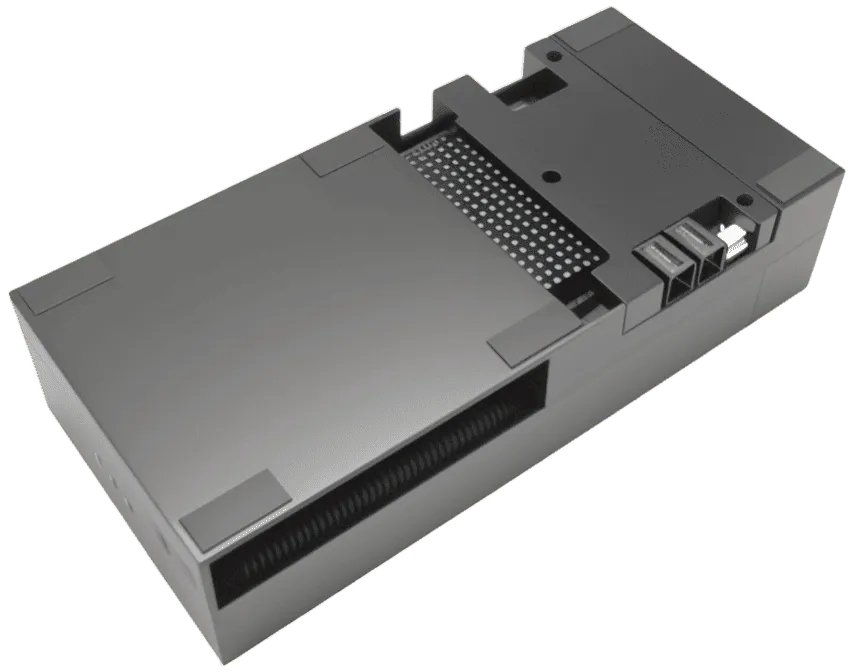
Key Features and Application
Features:
• Support NVIDIA JETSON THOR Platform
• Supported Camera Resolutions :Max 3840*2160
• Supported Camera Output Formats : RAW / YUV422
• Dimensions:L:243.12mm x W:112.4mm x H:56.88mm
• Compatible Camera Types :GMSL / GMSL2
• Maximum Supported Cameras :8 *GMSL
• SOC:NVIDlA Jetson T5000 Module
• Al Perfommance:2070 TFLOPS
• Memory:128 GB 256-bit LPDDR5X
Application:
• Robotics
• Industrial
• Medical
• Inspection
Getting Started
Hardware Overview

Block Diagram

- The TRD1 G2A uses 2 MAX96712 deserializers, each supporting up to 4 camera ports.
Supported Camera List
You may choose the following camera combinations to connect to the TRD1 G2A.
| Camera Combination | Number of Supported Cameras | Jetpack 7.0 |
|---|---|---|
| Comb. 1 | 4*8MP/30FPS | - |
| Comb. 2 | 8*3MP/30FPS | - |
| Comb. 3 | 6*5MP/30FPS | - |
| Comb. 4 | 2 *8MP/30FPS+4 *3MP/30FPS | - |
| Comb. 5 | 3 *5MP/30FPS+4 *3MP/30FPS | - |
| Comb. 6 | 2 *8MP/30FPS+3 *5MP/30FPS | - |
NVIDIA JetPack (Jetpack 7.0 / 7.1 / 7.2 ) is the official software development kit (SDK) for the Jetson series of development boards. It includes the operating system, drivers, CUDA, cuDNN, TensorRT, and other development tools and libraries. Each JetPack version typically corresponds to a specific Jetson Linux version (formerly known as L4T - Linux for Tegra).
- 39.2: L4T R39.2 (Jetpack 7.2)
- 38.4: L4T R38.4 (Jetpack 7.1)
- 38.2: L4T R38.2 (Jetpack 7.0)
For more information, visit NVIDIA's official Jetson Download Center.
Hardware Preparation
Parts List
| Serial number | Product model | Quantity | Remark |
|---|---|---|---|
| 1 | 945-14070-0080-000-MIPI | 1 | up to 8 cameras at most |
| 2 | T4JC-JC-ZZZZ-0500L (Female to Female 0.5m) | 2 | Standard configuration |
| 3 | Trigger Cable | 1 | Standard configuration |
| 4 | Power Conversion Cable | 1 | Standard configuration |
| 5 | Power adapter | 1 | Standard configuration |
| 6 | Multi-functional conversion socket | 1 | optional configuration |
Kit Contents

Installation Steps
- Connect the GMSL camera to the TRD1 G2A using the coaxial cable(up to 8 cameras at most)
- Connect the power supply(DC 9-16V)
- Power on the system(Jetson Thor)

Software Preparation
SDK Download
Select the appropriate driver package based on your camera type and JetPack version:
| JetPack Version | Framework | Driver Package | Supported Cameras | Download Link |
|---|---|---|---|---|
| JP7.2 | SIPL | TRD1_G2A_AGX_THOR_SIPL_JP7.2_L4TR39.2 | SG8-OX08DC-G2G, SG3-OX03H10C-G2F, SHW3G ×8, SHW5G ×8, Astra S56C/S56 ×4, SGX YUV series; (S56C ×1 + SHW5G ×2) ×2, (S56C ×1 + SHF3L ×2) ×2; external trigger sync | Download |
| JP7.2 | V4L2 | TRD1_G2A_GMSL2x8_JP7.2_L4TR39.2 | GMSL2 x8 general package: SGX YUV series (incl. SHW3H / SHF3L / SG8-ISX028C / SG8-OX08DC / SG2-ISX021C / SG3S11AFLK), Astra S36, Astra S56, Astra S56C, SHW5G, SHW3G, SG8-IMX728C, SDV11NM1 | Download |
| JP7.1 | V4L2 | TRD1_G2A_AGX_THOR_GMSL2x8_JP7.1_L4TR38.4 | GMSL2 x8 general package: SGX YUV series, SG8-OX08DC, SG8-IMX728C, SG8-ISX028C, SG3-OX03H10C, SHW3G, SHW5G, SDV11NM1, Astra S56, Astra S36 | Download |
| JP7.0 | V4L2 | TRD1_G2A_AGX_THOR_GMSL2x8_JP7.0_L4TR38.2 | GMSL2 x8 general package (heterogeneous connection supported): SG8-OX08DC, SHW3G, SHW5G, SGX YUV series, Astra S36, Astra S56, Astra S56C, SDV11NM1 | Download |
| JP7.0 | V4L2 | TRD1_G2A_YUV_JP7.0_L4TR38.2 | GMSL2 YUV cameras (SG2 / SG3S / SG5 / SG8S series, SHF3L, SHF3H) | Download |
Copy the full link address to DownGit to download
- SIPL packages are based on the NVIDIA SIPL camera framework supported since JetPack 7.2; V4L2 packages use the standard V4L2 / Argus camera path.
- Each driver package contains its own
Readme.md(bring-up steps) andVersion.md(change log). Please follow the Readme of the package you download.