GMSL2 摄像头分流器快速入门
概述
GMSL2 摄像头分流器由深圳市森云智能科技有限公司设计,可将一路 GMSL 输入分配为两路 GMSL 输出,并保持两路数据流一致。该设备兼容 SENSING GMSL 摄像头型号。
关键特性
- 无损数据传输
- 完整兼容 GMSL/GMSL2
- 超低延迟(微秒级)
- 极低插入损耗
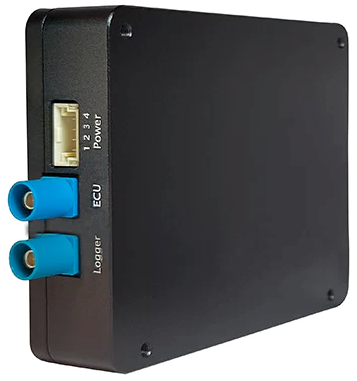
技术规格
| 参数 | 值 |
|---|---|
| 传输协议 | GMSL / GMSL2 |
| 输入端口 | 1 |
| 输出端口 | 2 |
| 输入接口 | 1× GMSL2 |
| 输出接口 | 2× GMSL2 |
| 支持的数据速率 | 1.5Gbps, 3Gbps, 6Gbps |
| 最大分辨率 | 最高 3840×2160 |
| 输出同步精度 | < 10μs |
| 电源 | 是 |
| 连接器 | Fakra Z 型 |
| 工作温度范围 | -40°C 至 +85°C |
| 尺寸 | 87.5mm × 70.6mm × 20mm |
| 颜色 | 黑色 |
| 重量 | < 150g |
尺寸
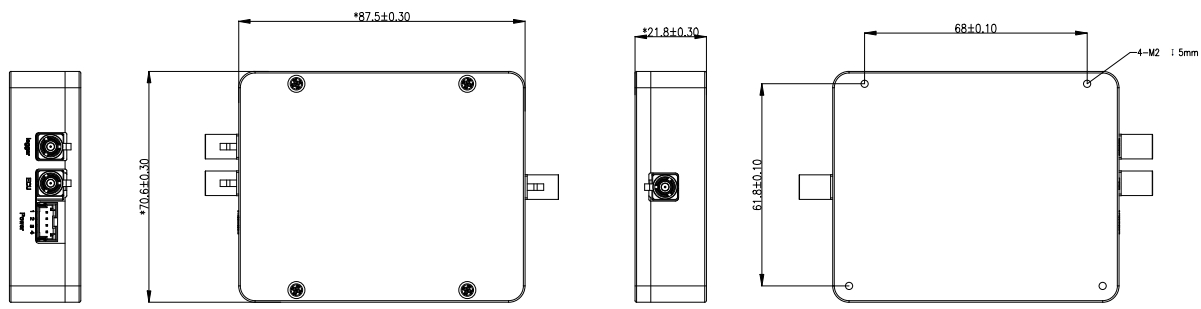
硬件概述
框图
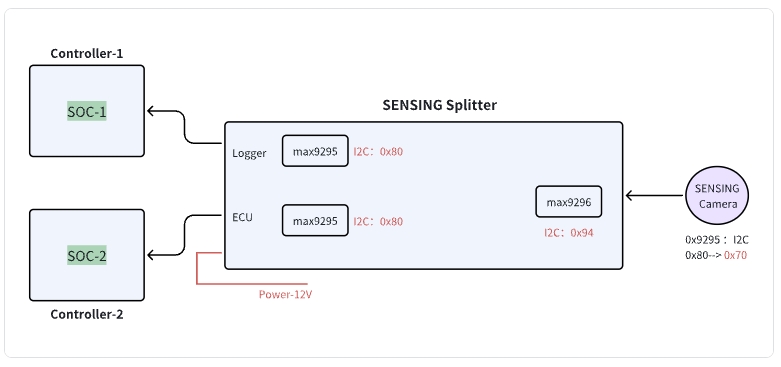
I2C 地址信息
| 设备 | I2C 地址(8-bit) | |
|---|---|---|
| 1 | 分流器:Logger | 0x80 |
| 2 | 分流器:ECU | 0x80 |
| 3 | 分流器:摄像头 | 0x94 |
| 4 | SENSING 摄像头 | 0x70 |
连接器引脚定义
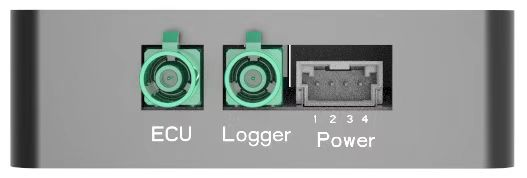
| 连接器 组件 | 料号 | 制造商/备注 |
|---|---|---|
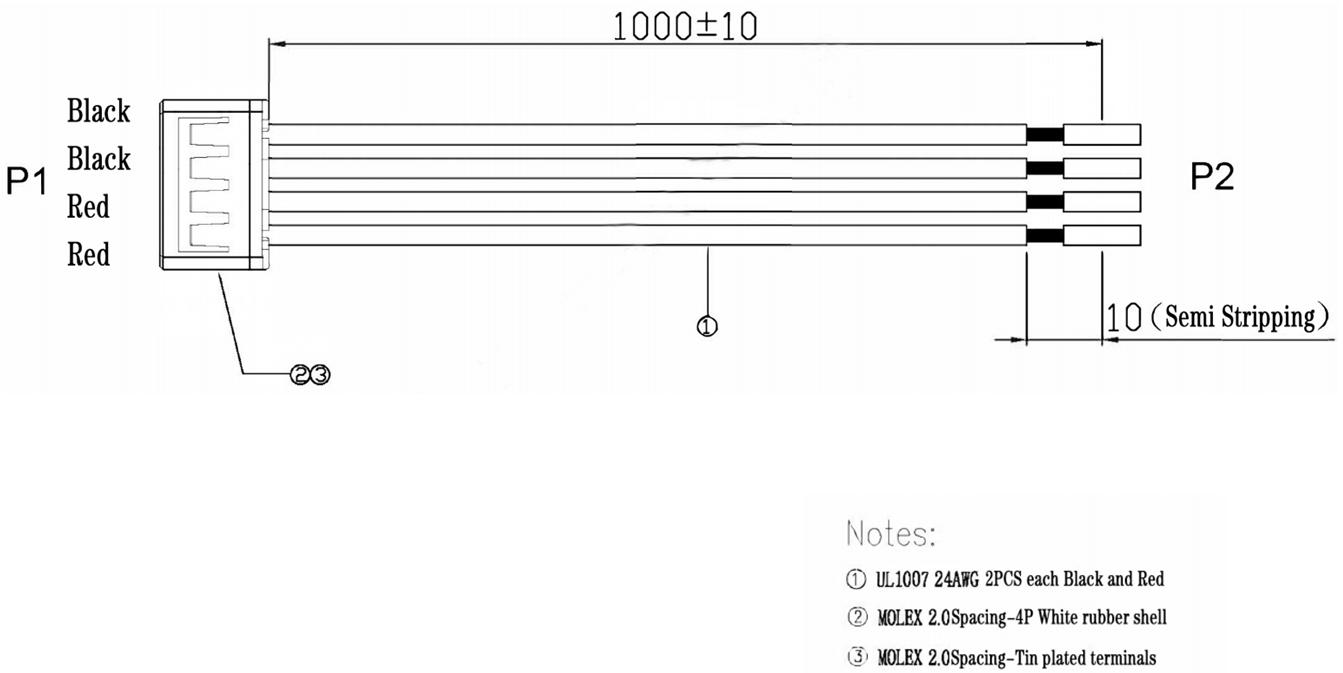
| 分流器设备连接器 | 50352-0400 | Molex |
| 线束 连接器 | 50351-0400 | Molex |
| 电源 | Pin3, Pin4 | 9~12V DC |
| 地 | Pin1, Pin2 | 公共地 |
线束定义
产品型号
| 产品型号 | 输入通道 | 输出通道 | 分辨率支持 | 处理器 | 数据传输速率 |
|---|---|---|---|---|---|
| SG2-BP0102-GMSL | 1CH | 2CH | 最高 1920×1080@30fps | MAX96705 | 1.5Gbps |
| SG8-BP0102-GMSL2 | 1CH | 2CH | 最高 3840×2160@30fps | MAX9295A | 6Gbps |
| SG8-BP0102-GMSL2F | 1CH | 2CH | 最高 1920×1080@30fps | MAX96717F | 3Gbps |
快速入门
1. GMSL2 摄像头分流器与客户自研平台集成
连接不同域控制器时使用分流器:
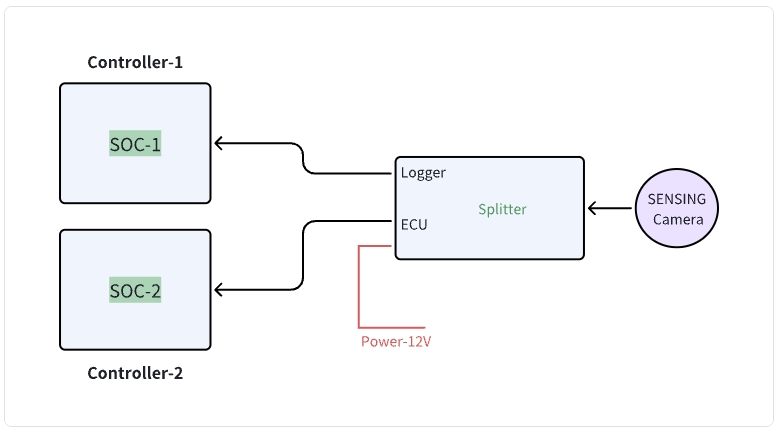
分流器框图 - 连接不同域控制器的配置
操作步骤
- 按上图连接系统。
- 先给分流器上电。
- 初始化控制器 1,控制器 1 会上电并初始化 Splitter-ECU;随后控制器 2 按上电流程初始化 Splitter-Logger。
- 由域控制器 1 和域控制器 2 执行正常操作命令以启动摄像头。
运行逻辑
- 分流器上电后会自动配置已连接摄像头。
- 域控制器 1 只需像配置摄像头一样配置分流器,然后正常触发即可激活成像链路。
提示
可参考以下软件流程和示例代码开发自定义驱动实现。
2. 控制器软件开发示例代码
- 驱动开发:
/* Example code for MAX9296 I2C initialization */
#define MAX9296_I2C_ADDR 0x90 // 8-bit address

int max9296_init() {
    // Initialize I2C bus
    i2c_init();

    // Disable MIPI output during configuration
    i2c_write(MAX9296_I2C_ADDR, 0x0313, 0x00);
    delay_ms(100);
    // Configure link settings for GMSL2 (6Gbps)
    i2c_write(MAX9296_I2C_ADDR, 0x0001, 0x02);

    // Configure linkA and linkB settings for GMSL2 selection (default value)
    i2c_write(MAX9296_I2C_ADDR, 0x0006, 0xC0);

    // Configure MIPI rate to 1200Mbps
    i2c_write(MAX9296_I2C_ADDR, 0x0320, 0x2C);

    // Enable MIPI output
    i2c_write(MAX9296_I2C_ADDR, 0x0313, 0x02);

    return 0;
}
- 分流器配置:
/* Example code for Splitter initialization */

#define MAX9295A_I2C_ADDR 0x80 // 8-bit address

int Splitter_init() {
    // Initialize deserializer first
    max9296_init();

    // Reset ISP
    i2c_write(MAX9295A_I2C_ADDR, 0x02BE, 0x10); // MFP0 high

    // Configure essential registers
    i2c_write(MAX9295A_I2C_ADDR, 0x0057, 0x12);
    i2c_write(MAX9295A_I2C_ADDR, 0x005B, 0x11);

    // Configure datatype to YUV422 8bit
    i2c_write(MAX9295A_I2C_ADDR, 0x0318, 0x5E);

    // Camera trigger sequence: MFP7 low to high
    i2c_write(MAX9295A_I2C_ADDR, 0x02D3, 0x00); // MFP7 low
    delay_ms(300);
    i2c_write(MAX9295A_I2C_ADDR, 0x02D3, 0x10); // MFP7 high

    // Initialize sensor,if without ISP, skip this step
    sensor_init();

    return 0;
}

int sensor_init() {
    // Initialize sensor
    i2c_write(sensor_I2C_ADDR, 0x0102, 0x0001);
    // Additional sensor initialization parameters
    // (Refer to Camera Information documentation for the complete sensor register configuration)
}
集成步骤
-
BSP 集成:
- 修改设备树以加入 GMSL2 接口配置
- 将摄像头驱动加入内核构建配置
- 配置摄像头的 media controller pipeline
-
应用开发:
/* Example code for capturing camera frames */
#include "camera_api.h"

int main() {
    // Open camera device
    int fd = open("/dev/video0", O_RDWR);
    if (fd < 0) {
        perror("Failed to open camera device");
        return -1;
    }

    // Configure video capture format
    struct v4l2_format fmt = {0};
    fmt.type = V4L2_BUF_TYPE_VIDEO_CAPTURE;
    fmt.fmt.pix.width = 1920;
    fmt.fmt.pix.height = 1536;
    fmt.fmt.pix.pixelformat = V4L2_PIX_FMT_YUYV;

    if (ioctl(fd, VIDIOC_S_FMT, &fmt) < 0) {
        perror("Failed to set format");
        close(fd);
        return -1;
    }

    // Request and map buffers
    // ... (buffer setup code) ...

    // Start streaming
    // ... (streaming code) ...

    // Capture and process frames
    // ... (frame processing code) ...

    // Cleanup
    close(fd);
    return 0;
}
步骤 2:数据处理
通过 GMSL2 接口接收模块数据后:
- 数据接收
- 实现 GMSL2 协议
- 配置数据速率
- 图像处理流水线
- 解析 YUV422 8bit 数据
- 图像格式转换
技术支持
-
文档
- 完整寄存器说明
- 集成指南
-
工程支持
- 技术咨询
- 调试协助
- 性能优化
提示
SENSING Technology 可为大多数平台集成提供专业技术支持。如需详细文档、示例代码和技术协助,请联系支持团队。