摄像头触发与同步指南
1. 系统 概述
系统由控制器(包括 SoC 和解串器)、摄像头(包括串行器和传感器)以及其他设备组成。SENSING 的主要产品是摄像头。
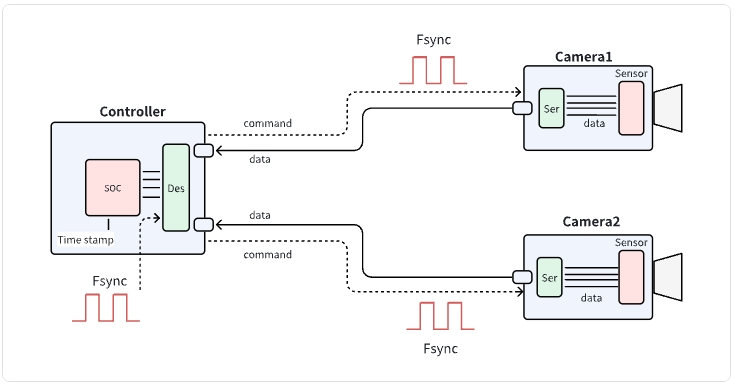
- 外部 Fsync 信号输入到控制器后,会经过控制器侧 Deserializer 透明转发到多路摄像头的 Serializer,从而实现多摄像头同时硬件触发。
- 解串器和串行器都必须正确配置,才能支持 Fsync 信号透传。
- 同一路 Fsync 信号也可以分配给 LiDAR 或其他传感器,实现多传感器硬件级同步。
- 由于这是基于硬件的同步方式,Fsync 信号传播延迟和数据传输延迟通常可忽略(一般在微秒级)。
2. 验证同步
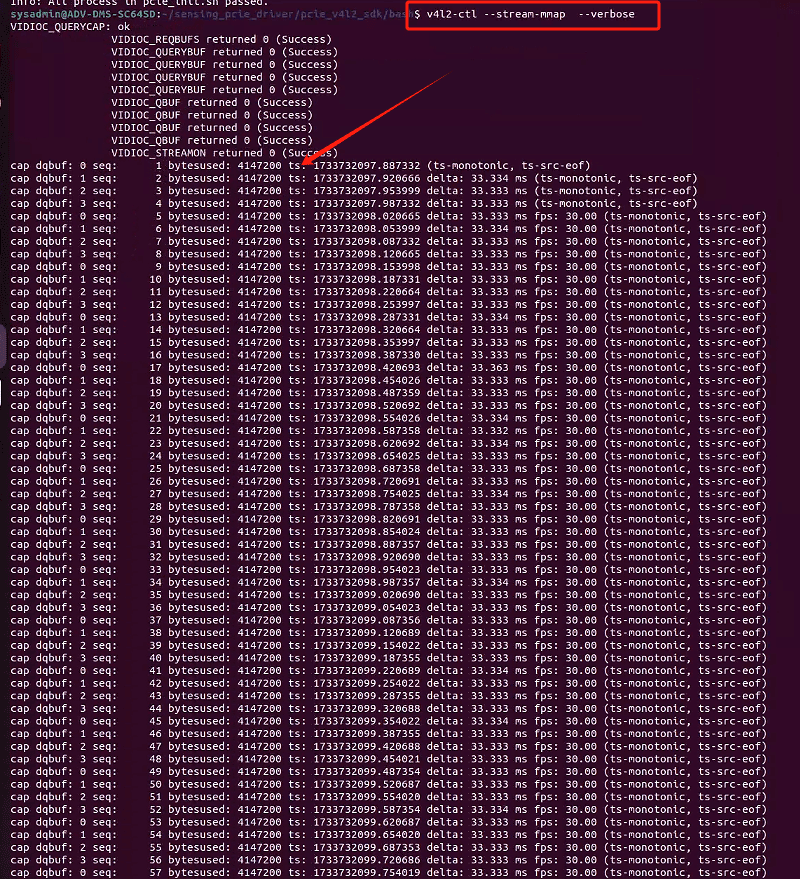
- 推荐方法是在摄像头端或控制器端打印并比较每帧时间戳。
- 如果多路摄像头的时间戳高度接近(或相同),即可认为同步成功。
3. Fsync 信号规格
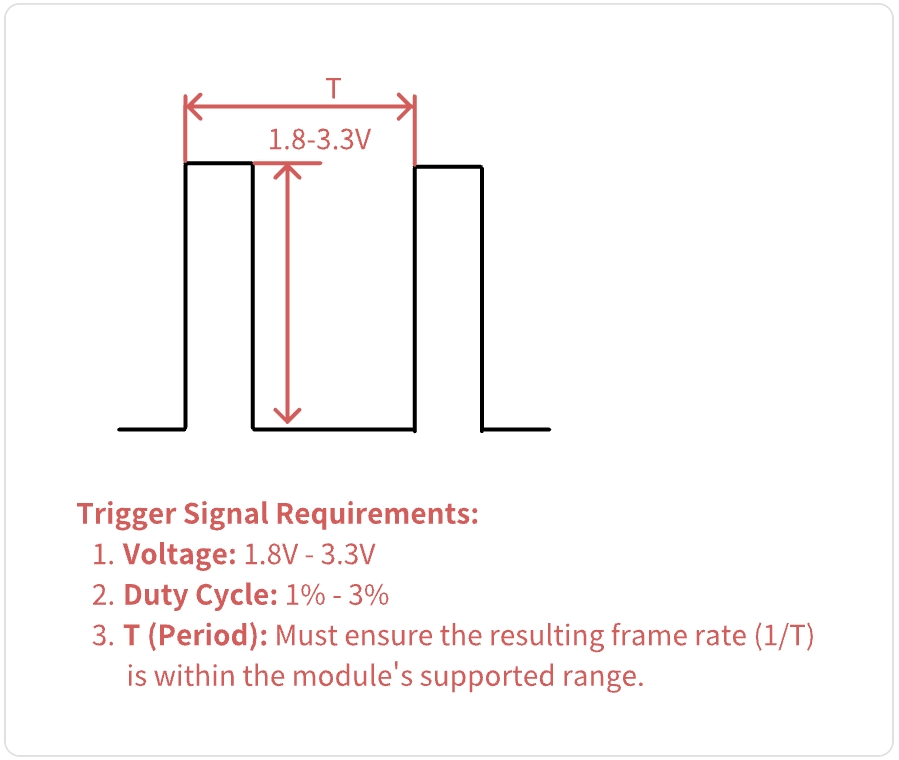
- Fsync 信号需要满足电平、脉宽和频率等要求。详细参数请参考硬件文档。
4. 寄存器 配置 示例
下面是用于启用 Fsync 透传的典型寄存器配置。请根据硬件数据手册调整地址和值。
- 以下配置将 ub954-GPIO0 的 frameSync 传递到 ub953-GPIO0,并将 ub954-GPIO0 用作 frameSync 输入。
#!/bin/bash


# ub954 LinkA Initialization to pair with FPDLINK Serializers
#
# Use ub954's linkA input and port0 output
# ub954 I2C address: 0x3D(7Bit)Designed according to customer hardware
# ub953 I2C address: 0x18(7Bit)consistent


#Command description:
#i2cset -f -y 1 0x48 0x06 0xEF

# “1” represents the I2C bus number.It is subject to the actual situation
#    of the customer's own platform.
# “0x48” represents the I2C address of the deserializer.
# “0x06” represents the register address of the deserializer
# “0xEF” represents the value corresponding to the deserializer register address.


#reset ub954
i2cset -f -y 1 0x3D 0x01 0x02
sleep 0.3
#choose port0
i2cset -f -y 1 0x3D 0x4c 0x01
i2cset -f -y 1 0x3D 0x20 0x20

#choose port1
#i2cset -f -y 1 0x3D 0x4c 0x12
#i2cset -f -y 1 0x3D 0x20 0x10

i2cset -f -y 1 0x3D 0x58 0x5E
#set ub954  I2C address alias
i2cset -f -y 1 0x3D 0x5C 0x30
#set camera  I2C address
i2cset -f -y 1 0x3D 0x5D 0x20
#set camera  I2C address alias
i2cset -f -y 1 0x3D 0x65 0x20
#mipi lane rate 800Mbps
i2cset -f -y 1 0x3D 0x1F 0x02
#Enable mipi output, 4-lane, continuous clock mode
i2cset -f -y 1 0x3D 0x33 0x03
sleep 0.3

#reset ub953
i2cset -f -y 1 0x18 0x01 0x02
sleep 0.3
#4-lane, continuous clock mode
i2cset -f -y 1 0x18 0x02 0x73

#set GPIO0、GPIO1 outputEnable
i2cset -f -y 1 0x18 0x0E 0x3C
#GPIO0 output, remote control
i2cset -f -y 1 0x18 0x0D 0xD2
#transfer ub954-GPIO0 frameSync to ub953-GPIO0
i2cset -f -y 1 0x3D 0x0F 0x7F
sleep 0.3
i2cset -f -y 1 0x3D 0x10 0x00
i2cset -f -y 1 0x3D 0x18 0x84
i2cset -f -y 1 0x3D 0x6E 0x8A
注意: 请始终参考器件数据手册,确认正确的寄存器地址和配置值。
提示
如需额外配置选项或有特定需求,请联系我们的技术支持团队获取帮助。