SG8A-ORIN-GMSL2 (Discontinued)
This product has been discontinued and is no longer available for purchase. This documentation is maintained for reference purposes for existing customers. For current product alternatives, please contact our sales team.
Overview
SG8A-ORIN-GMSL2 adapter board, which allows up to 8 cameras to be connected to the Jetson AGX Orin module, is fully compatible with the NVIDIA Jetson AGX Orin Development Kit. As there are many different types of GMSL cameras available, the adapter board can be adaptively operated at different frequencies i.e. it is compatible with both GMSL and GMSL2 protocol interfaces through software configuration. The GMSL camera is powered by PoC (Power over Coax), so all data, control signals and power are sent over a 50 Ohm coaxial cable, making the camera's cable routing flexible and easy to install in automotive applications.
- 8 camera support
- GMSL/GMSL2 compatible
- PoC power supply
- Easy installation

Getting Started
Specification
- Model: SG8A-ORIN-GMSL2
- Dimension: 104mm*74mm
- Weight: 50g
- Connector: 1x120Pin High-density
- Camera input: Camera*8(GMSL2/GMSL)
- Trigger In: 12Pin Sync In
- Deserializer: MAXIM(ADI) MAX9296A*4
- Camera Connector: Fakra Z Code
- POC Power Supply: DC 8-16V
- DC Power Supply: DC 12-24V
- Operating Conditions: -20°C to +85°C
- Adaptation kit: Jetson AGX Orin/Xavier
Hardware Overview

Block Diagram
(1)The I2C bus number is the hardware location (matching the connector J2 pin). The bus number does not necessarily correspond to what is listed in the software.
(2)The coaxial power supply is shared, but each GMSL line has its own filter.

Supported Camera List
The following cameras are supported with different JetPack versions:
| Camera | Output Data | Jetpack 5.1.2 | Jetpack 6.0DP | Jetpack 6.0 | Jetpack 6.1 | Jetpack 6.2 |
|---|---|---|---|---|---|---|
| SG1-OX01F10C-GMSL-Hxxx | YUV422 | ✅ | ✅ | ✅ | - | - |
| SG1S-OX01F10C-G1G-Hxxx | YUV422 | ✅ | - | - | - | - |
| SG2-AR0231C-0202-GMSL-Hxxx | YUV422 | ✅ | ✅ | ✅ | - | - |
| SG2-AR0233C-5200-G2A-Hxxx | YUV422 | ✅ | ✅ | ✅ | - | ✅ |
| SG2-IMX390C-5200-G2A-Hxxx | YUV422 | ✅ | ✅ | ✅ | - | ✅ |
| SG2-OX03CC-5200-GMSL2F-Hxxx | YUV422 | ✅ | ✅ | ✅ | - | ✅ |
| SG3S-ISX031C-GMSL2-Hxxx | YUV422 | ✅ | ✅ | ✅ | - | ✅ |
| SG3S-ISX031C-GMSL2F-Hxxx | YUV422 | ✅ | ✅ | ✅ | - | ✅ |
| SG3S-OX03JC-G2F-Hxxx | YUV422 | ✅ | ✅ | ✅ | - | - |
| SG5-IMX490C-5300-GMSL2-Hxxx | YUV422 | ✅ | ✅ | ✅ | - | ✅ |
| SG5-OX05BC-4000-GMSL2-Hxxx | YUV422 | ✅ | - | - | - | - |
| SG8S-AR0820C-5300-G2A-Hxxx | YUV422 | ✅ | ✅ | ✅ | - | ✅ |
| SG8-OX08BC-5300-GMSL2-Hxxx | YUV422 | ✅ | ✅ | ✅ | - | ✅ |
| DMSBBFAN | YUV422 | ✅ | - | - | - | ✅ |
| SG3S-IMX623C-G2F-Hxxx | RAW12 | - | - | - | - | - |
| SG8-IMX728C-G2G-Hxxx | RAW12 | ✅ | - | ✅ | - | - |
NVIDIA JetPack (Jetpack 5.1.2 or Jetpack 6.0 ) is the official software development kit (SDK) for the Jetson series of development boards. It includes the operating system, drivers, CUDA, cuDNN, TensorRT, and other development tools and libraries. Each JetPack version typically corresponds to a specific Jetson Linux version (formerly known as L4T - Linux for Tegra).
- 36.4.3: L4T R36.4.3 (Jetpack 6.2)
- 36.4: L4T R36.4 (Jetpack 6.1)
- 36.3: L4T R36.3 (Jetpack 6.0)
- 35.4.1: L4T R35.4.1 (Jetpack 5.1.2)
For more information, visit NVIDIA's official Jetson Download Center.
Hardware Preparation
Parts List
- Power adapter
- Power switching harness
- SG8A-ORIN-GMSL2 adapter board
- Copper column, M2.5*16 (3 pcs)
- Screw, M2.5-F (3 pcs)
- Jetson AGX Orin DK
Kit Contents
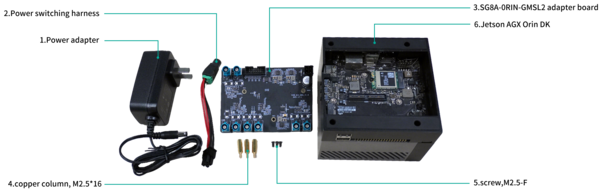
Installation Steps
- Connect the GMSL camera to the SG8A-ORIN-GMSL2 board using the coaxial cable
- Mount the SG8A-ORIN-GMSL2 board onto the Jetson AGX Orin module
- Connect the power supply
- Power on the system
Software Preparation
SDK Download
Select the appropriate driver package based on your camera type and JetPack version:
| Camera Type | JetPack Version | Download Link |
|---|---|---|
| GMSL Camera (YUV) | JP5.1.2 | Download |
| GMSL Camera (YUV) | JP6.0 | Download |
| GMSL2 Camera (YUV) | JP5.1.2 | Download |
| GMSL2 Camera (YUV) | JP6.0 | Download |
| GMSL2 Camera (RAW) | JP5.1.2 | Download |
| GMSL2 Camera (RAW) | JP6.0 | Download |
Copy the full link address to DownGit to download
Quick Bring Up
We can use NVIDIA SDK Manager Linux Software or directly use the NVIDIA Linux Driver Package via Linux command line to flash JetPack OS into the NVIDIA Jetson device. For beginners, we highly recommend NVIDIA SDK Manager.

-
Copy the driver package to the working directory of the Jetson device, such as “/home/nvidia”
/home/nvidia/SG8A_ORIN_GMSL2-F_V2_AGX_Orin_YUV_JP5.1.2_L4TR35.4.1 -
Enter the driver directory
cd SG8A_ORIN_GMSL2-F_V2_AGX_Orin_YUV_JP5.1.2_L4TR35.4.1 -
Give executable permissions to the script "quick_bring_up.sh" and execute the script
chmod a+x quick_bring_up.sh
sudo ./quick_bring_up.sh -
Select the camera type. This step will install Image and DTB, after the script run complete. You need to reboot the device to let the Image and DTB take effect. For example:
This package is use for Sensing SG8A-ORING-GMSL on JetPack-5.1.2-L4T-35.4.1
1.sgx-yuv-gmsl1
2.sgx-yuv-gmsl2
Press select your camera type:
2
At this point, you should type 1 to select your camera type and then hit Enter
-
After the device reboots, enter the driver directory and run the script "quick_bring_up.sh"
sudo ./quick_bring_up.sh -
Select the camera type. Select the sgx-yuv-gmsl2 camera type, then select SG2-IMX390C-5200-GMSL2, and finally enter 0-7 the camera port you are connected to to turn on the camera.
This package is use for Sensing SG8A-ORING-GMSL on JetPack-5.1.2-L4T-35.4.1
1.sgx-yuv-gmsl1
2.sgx-yuv-gmsl2
Press select your camera type:
2
Press select your yuv camera type:
0:SG2-IMX390C-5200-GMSL2
1:SG2-AR0233-5300-GMSL2
2.SG2-OX03CC-5200-GMSL2F
3.SG3-ISX031C-GMSL2F
4.SG5-IMX490C-5200-GMSL2
5.SG8-AR0820C-5300-GMSL2
6.SG8-OX08BC-5300-GMSL2
0
Press select your camera port [0-7]:
0
ready bring up camera
Use the following command to light the camera!
gst-launch-1.0 v4l2src device=/dev/video0 ! xvimagesink -ev -
Select one of the commands prompted above to light the camera.
Integration with SENSING Driver Source Code
-
Compile Image & dtb Refer to the following command to integrate Dtb and Kernel source code to your kernel
cp camera-driver-package/source/hardware Linux_for_Tegra/source/public/$YourDir/hardware -r
cp camera-driver-package/source/kernel Linux_for_Tegra/source/public/$YourDir/kernel -r -
Go to the root directory of your source code and recompile
cd  Linux_for_Tegra/source/public/$YourDir/
export CROSS_COMPILE_AARCH64_PATH=toolchain-path
export CROSS_COMPILE_AARCH64=toolchain-path/bin/aarch64-buildroot-linux-gnu-
mkdir kernel_out
./nvbuild.sh -o $PWD/kernel_out -
Install the newly generated Image and dtb to your nvidia device and reboot to let them take effect
dtb:kernel_out/arch/arm64/boot/dts/nvidia/
Image: kernel_out/arch/arm64/boot/Image -
Install camera driver
sudo insmod ./ko/max9295.ko
sudo insmod ./ko/max9296.ko
sudo insmod ./ko/sgx-yuv-gmsl2.ko -
Bring up the camera
gst-launch-1.0 v4l2src device=/dev/video0 ! xvimagesink -ev
FAQ
For details, please click here